Every page on a public Dewstack docs site is also served as markdown. Add .md to the page's URL
and you get the content with no navigation, no sidebar, no footer – just headings, prose, lists,
tables and code.
https://docs.acme.com/docs/hosting/custom-domain
https://docs.acme.com/docs/hosting/custom-domain.md
This works for nested pages too – /docs/<collection>/<parent>/<child>.md – and for pages behind
a private-link token, where the token stays in the path.
What the .md response looks like
The markdown is generated from the published HTML at request time, so it always matches what the
page currently shows. The response is text/markdown; charset=utf-8 and carries an
X-Robots-Tag: noindex header, which keeps search engines from indexing the markdown twin
alongside the real page and splitting your ranking between two URLs.
Nothing about the .md URL requires a key, a header or a query parameter. curl it, paste it into
a chat window, or point a script at it:
curl https://docs.acme.com/docs/hosting/custom-domain.mdEvery article page also declares the alternate in its <head>, so a crawler that never guesses at
URL suffixes still finds it:
<link rel="alternate" type="text/markdown"
      href="https://docs.acme.com/docs/hosting/custom-domain.md"
      title="Point a custom domain at your docs (Markdown)">
The Copy page button
On every article page of a public workspace, a split button sits near the top of the content. The
main half is labelled Copy page; clicking it fetches the page's .md URL and puts that
markdown on the clipboard, and the label changes to Copied for two seconds.
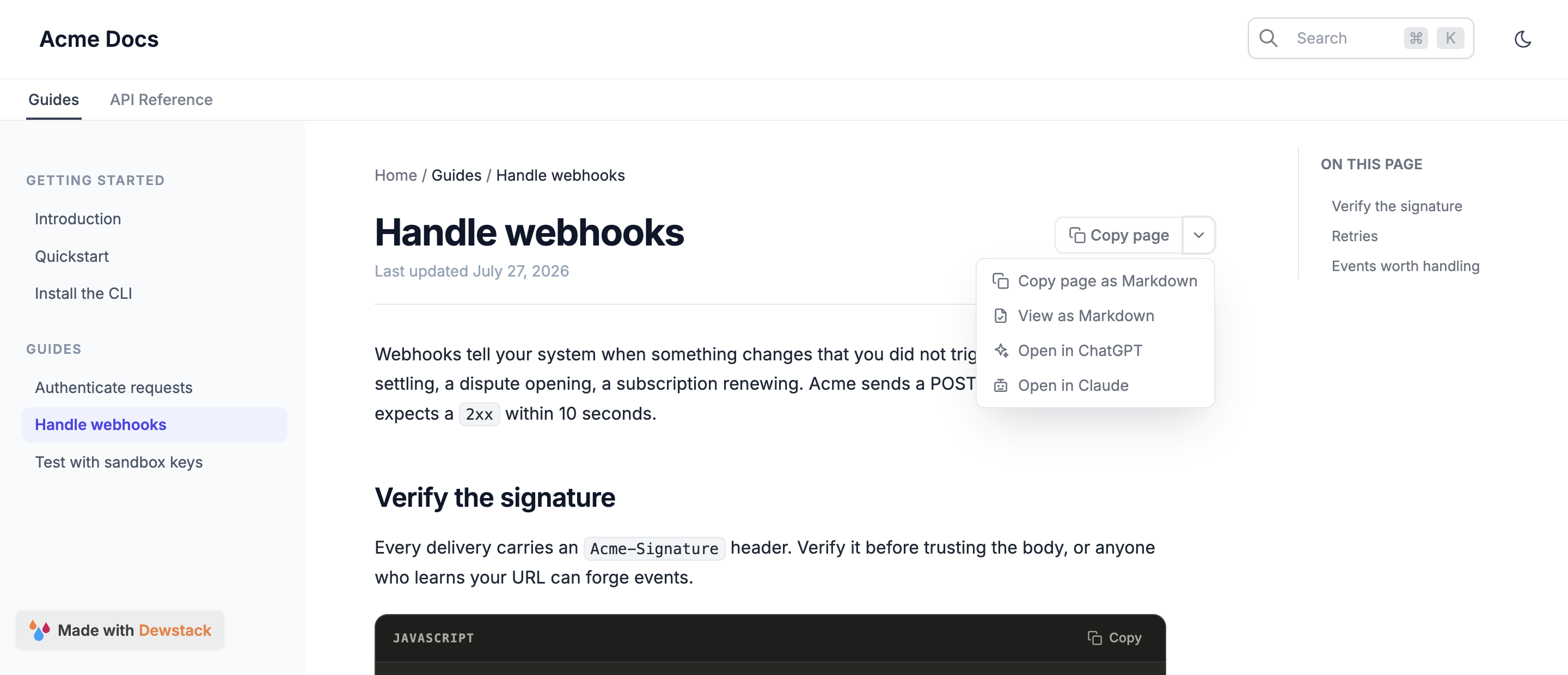
The chevron half opens a menu with four items:
| Item | What it does |
|---|---|
| Copy page as Markdown | Same as the main button – puts the page's markdown on the clipboard |
| View as Markdown | Opens the .md URL in a new tab |
| Open in ChatGPT | Opens chatgpt.com with a prompt already typed |
| Open in Claude | Opens claude.ai with the same prompt already typed |
What "Open in ChatGPT" and "Open in Claude" actually send
Neither one uploads your page. They open the assistant with a prefilled prompt that points at the page's markdown URL:
Read from https://docs.acme.com/docs/hosting/custom-domain.md so I can ask questions about it
The reader presses enter, the assistant fetches the URL itself, and the conversation starts with the correct, current page in context rather than whatever the model remembers. Because the assistant does the fetching, this only works for pages it can reach – a private or password-protected docs site will not load, which is consistent with the button not being rendered there at all.
Public workspaces only
The Copy page button renders only when the workspace's visibility is Public. Private and
password-protected sites show no button, and their .md URLs are reachable only with whatever
access the reader already has. Change visibility under
Hosting & Visibility.
When to use which
Reach for the .md URL when you want one page: filing a bug with the exact doc text, pasting
a procedure into a support reply, or feeding a single page to a model. Reach for
/llms-full.txt when you want everything, and for
/mcp when you want an assistant to search and decide for itself
which pages it needs.
Limits and requirements
- Public workspaces only for the Copy page button and its menu.
- Markdown is rendered from published HTML, so published pages only – a draft has no
.mdalternate. .mdresponses are markednoindexand will not appear in search results.- The clipboard copy uses the browser's clipboard API, with a fallback for older browsers; View as Markdown always works regardless.
