SmartDocs is Dewstack's AI question-answering layer for your published documentation. A reader types a question in their own words, and SmartDocs writes an answer grounded in your content and links the pages it drew from – instead of leaving them to guess which of your forty pages holds the answer.
It only knows what you have published and trained it on. SmartDocs does not answer from a general model's memory of the internet, and it does not see your drafts.
The two places readers meet SmartDocs
On your docs site, SmartDocs shows up in exactly two places.
The "Ask a question" widget. A floating button in the corner of every page. Clicking it opens a chat panel where the reader can ask anything and follow up. You control the button's label, colour and icon, and you can seed the panel with suggested questions – see Configuring SmartDocs.
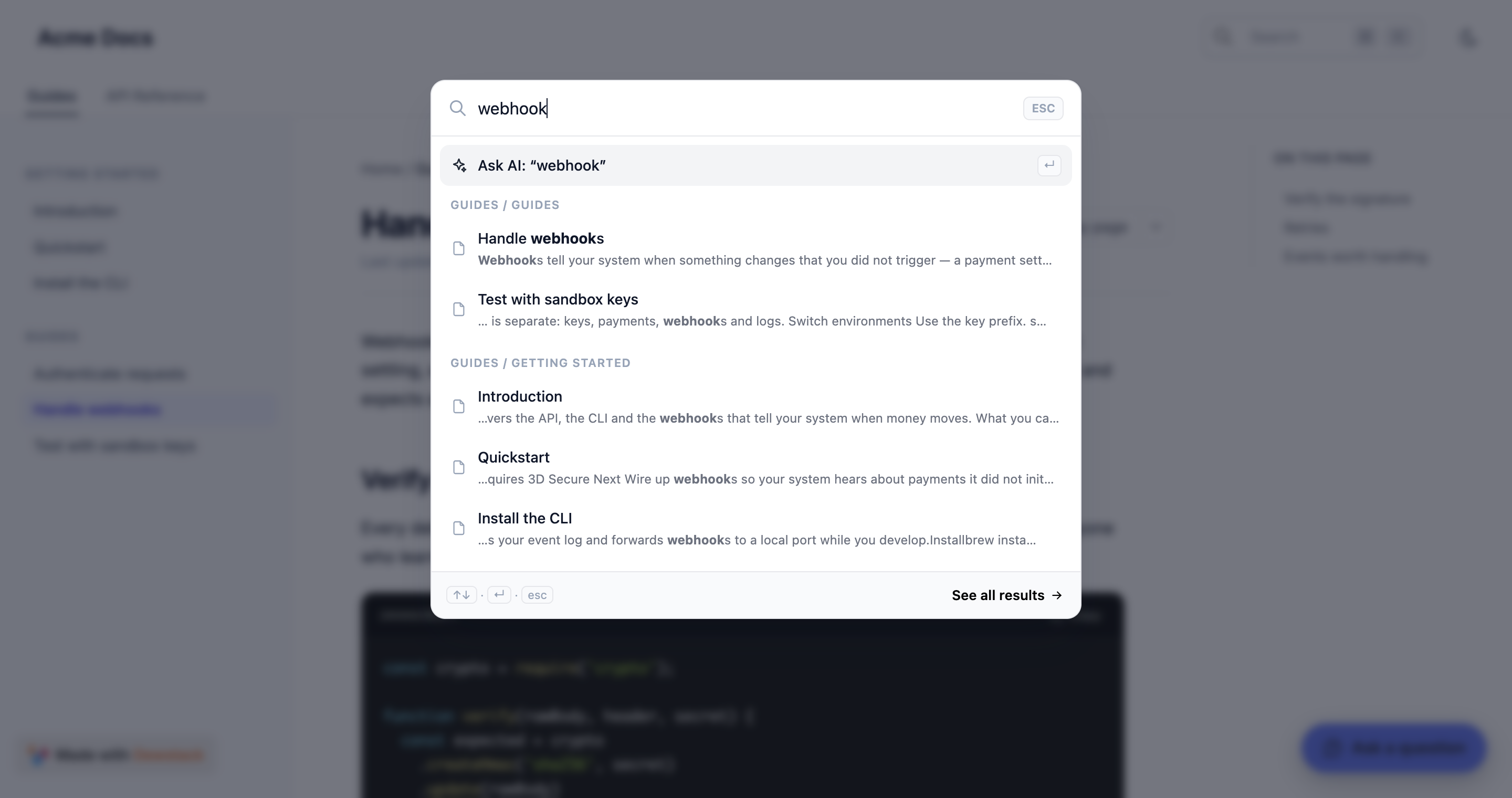
The "Ask AI" row in search. Open the search modal with ⌘K (Ctrl+K on Windows and Linux)
and start typing. As soon as the query is non-empty, an Ask AI row appears at the top of the
results, showing the query in quotes. Press enter and the answer replaces the result list in the
same modal, with the source URLs listed underneath. This is the entry point most readers hit,
because they were already searching.
That row is gated on the same two switches as the floating button: SmartDocs must be on and the
'Ask a Question' widget must be enabled. With either one off, ⌘K is search only.
Where the answers come from
SmartDocs answers from a model you train on your own content, in the Train the Docs tab. You pick which published pages and which imported documents go into the model and run the training; answers are then generated against that trained set only.
This is the practical consequence: a page you just published is not in the answers until you retrain. SmartDocs is not a live index of your workspace the way MCP is. Retrain after a meaningful content change.
Each answer comes back with the URLs it drew from, so a reader who wants the full context can click through to the real page.
What decides whether readers see it
Four things must all be true before either entry point renders. If the widget is missing from your docs site, walk this list in order:
- The reader has access to the whole workspace. A reader let in on a private link that is scoped to specific collections does not get SmartDocs – the feature requires access to all collections, because an answer could otherwise quote a page that reader cannot open.
- SmartDocs is enabled for the workspace, via the master Enable SmartDocs toggle.
- The 'Ask a Question' widget is enabled, via its own separate toggle in the 'Ask a Question' Settings tab. This one is missed often: SmartDocs can be on while the reader-facing widget is off.
- A model has been trained. Without training there is nothing to answer from.
The check runs on the server, so a reader who fails it gets no widget and no Ask AI row – there is nothing to inspect in the page source and nothing to work around.
This is separate from your workspace's visibility
SmartDocs runs on private and password-protected docs sites too, for readers who are authorized.
That is unlike the AI-ready surfaces – llms.txt, .md
alternates and /mcp – which require Public visibility.
What it costs
Every answer spends one of your workspace's message credits. That applies to the widget, to
the Ask AI row, and to the POST /v1/ask REST endpoint,
which is the same engine behind an API key. Your credit balance and consumption are on the
SmartDocs Dashboard tab.
Two separate allowances govern SmartDocs, and your plan sets both:
| Plan | Assistants | AI queries per month | Training characters per assistant |
|---|---|---|---|
| Starter | 2 | 2,000 | 4M |
| Pro | 5 | 5,000 | 20M |
| Premium | 10 | 10,000 | 60M |
| Enterprise | Negotiated | Negotiated | Negotiated |
An assistant is one trained index; the training-character figure is how much content that index can hold. The Train Docs screen totals the characters of everything you have selected and shows it against Plan Limit. Going over is a hard stop, not a truncation: the counter turns red with Limit exceeded and the training button is disabled until you deselect enough pages. On a large corpus that ceiling bites well before the monthly query count does. See Subscription and billing for the rest of the plan gates.
Reading your docs over MCP costs nothing – an assistant can search and fetch your whole published corpus without touching the message quota, because it is doing the reasoning itself rather than asking Dewstack to.
