Dewstack sells four plans – Starter, Pro, Premium and Enterprise – and your plan decides how many workspaces you get, how many AI assistants and monthly AI queries you have, whether analytics and Page Assist are available, and whether the Import Center, SmartDocs and API & Agents entries appear in your sidebar at all. Manage all of it on the Subscription page, reached from the avatar menu in the bottom-left corner.
Current prices are on dewstack.com/pricing; this page documents what each plan lets you do rather than what it costs.
The Subscription page only appears for roles that have the manage subscription permission. If it is missing from your avatar menu, that is why.
What the Subscription page shows
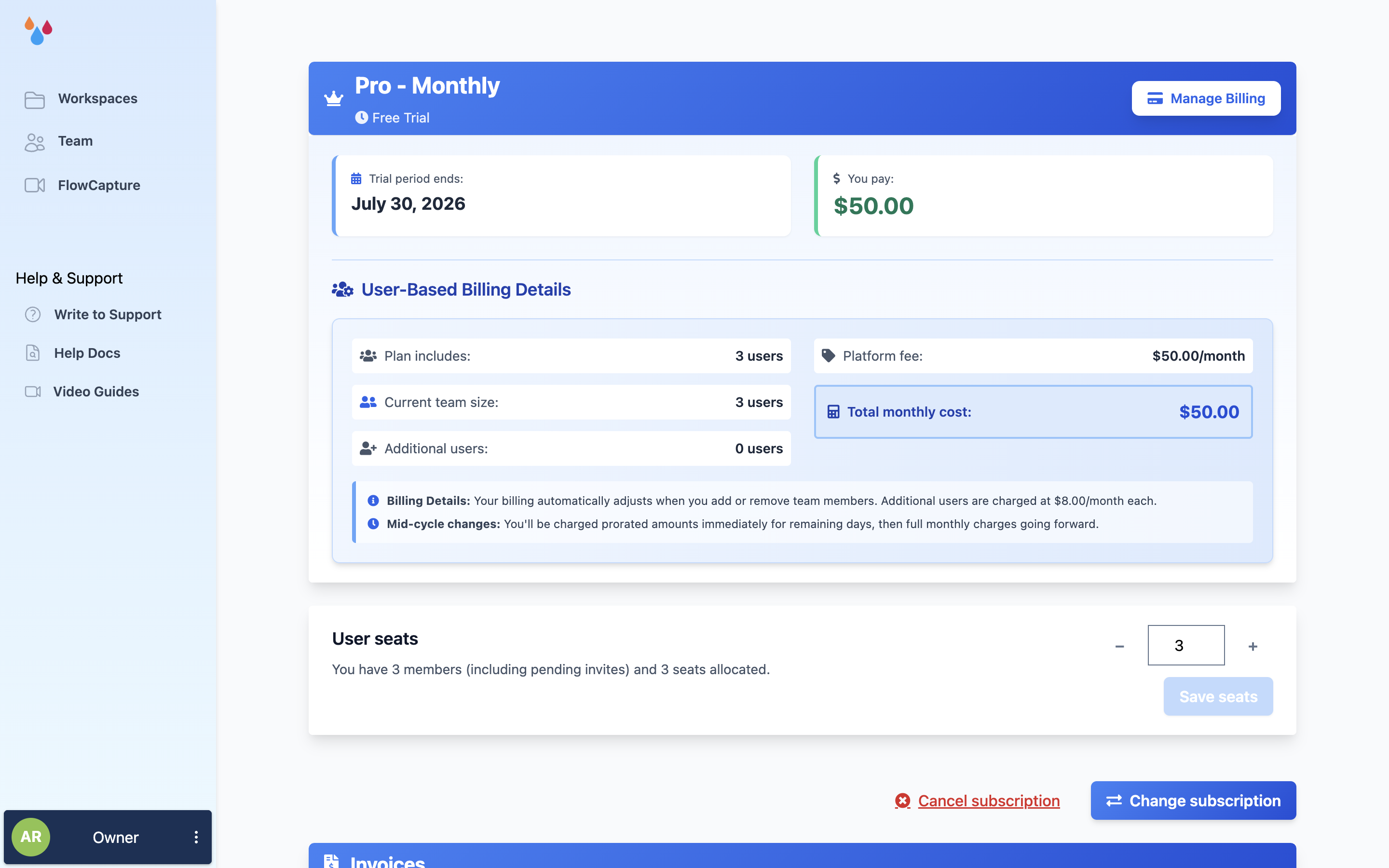
The top card names your current plan and billing interval (Annual or Monthly) with a status chip: Active Subscription, Free Trial, Past Due, or Cancels on followed by a date. Beside it is the next billing date, or Trial period ends: while you are on a trial.
On per-seat plans the same card breaks the bill down: Included seats:, Additional users:, Platform fee: and Total monthly cost: or Total annual cost:.
Manage Billing opens the Stripe billing portal in a new tab. That is where you change the card on file – there is no payment-method form inside Dewstack itself.
What changes when you move between plans
Every gate below is enforced by plan name in the product, not by a feature flag you can request. Enterprise matches Premium on all of these.
| Starter | Pro | Premium / Enterprise | |
|---|---|---|---|
| Workspaces | 3 | 10 | Unlimited |
| Included seats | 1 | 3 | 5 (Enterprise: 25) |
| SmartDocs assistants | 2 | 5 | 10 |
| AI queries per month | 2,000 | 5,000 | 10,000 |
| Training characters per assistant | 4M | 20M | 60M |
| Private link visibility | Yes | Yes | Yes |
| Password-protected visibility | No | No | Yes |
| Custom domain | Yes | Yes | Yes |
| Collection-scoped access rules | No | Yes | Yes |
| Page revisions kept | Last 50 | Last 100 | Unlimited |
| Analytics tabs | Overview, Content | All four | All four |
| Analytics date range | 30 days | 60 days | 180 days |
| Page Assist | Yes | Yes | Yes |
| Import Center service connections | No | Yes | Yes |
A few of these are worth spelling out:
- Private versus protected. Any paid plan can publish a workspace behind a private link; password protection is Premium and Enterprise only. Restricting either rule to specific collections needs Pro or above – below that the Select Specific Collections option is disabled with a padlock. See Access and content sharing.
- The sidebar. Without a subscription and without an active trial, Dewstack removes the SmartDocs, Import Center and API & Agents entries entirely rather than showing them locked. Those three also require the manage SmartDocs or manage import center permission on your role, so a Creator or Editor may not see them on any plan.
Trials
New Dewstack accounts start on a 7-day trial with full access, and the trial is more generous than the plan you are trialling: analytics run at Pro depth, 100 page revisions are kept, and collection access, password protection, Page Assist and Import Center connections are all unlocked. Workspaces are capped at 3, and SmartDocs comes with 500 message credits.
The 7 days are counted from when you confirm your email address, not from when you sign up, so a slow inbox does not cost you trial time.
No card is required, and none is taken. The banner reads "You're exploring Dewstack with full access. Upgrade anytime to keep your setup." alongside a TRIAL badge counting down the days remaining: "3 days left", "1 day left", then "Last day!".
Changing plan during a trial does not charge you: "Your new plan pricing will start when your trial ends. No proration or immediate charges."
What happens when a trial expires without a subscription
The account drops to a free tier, the banner changes to FREE PLAN, and Dewstack changes your published sites. Custom domains are switched off, though the value is kept and restored if you later subscribe. The Made with Dewstack badge is turned back on. Your SmartDocs message credits are set to zero.
You can still sign in and see your workspaces, but opening one to edit or customize it is locked until you subscribe.
What happens after the grace period
Your published docs stay online for 14 days after the trial ends, so existing links keep working while you decide. After that the hosted site is taken offline: the public site, any custom domain, the widget, llms.txt, the sitemap and the API all stop responding.
Nothing is deleted. Your collections, pages and settings are intact and untouched. Subscribing brings the site straight back, with its custom domain restored from backup.
Change your plan
Click Change subscription on the Subscription page. Pick a plan under Choose Your Plan and an interval under Billing Cycle, both dropdowns. Before you confirm, the page previews Change versus current bill:, Key benefits unlocked: and Features you will lose: – read the last one, because downgrades take effect on your content, not just on your bill. Click Change Subscription to confirm; a toast reads "Subscription changed."
Seat count is adjusted on the Subscription page before you start this flow, not inside it. Proration figures shown in the preview are estimates.
Invoices
The Invoices card sits at the bottom of the Subscription page and lists every invoice with its date, total and a status badge – PAID, OPEN or VOID. Each row is a link: "Click to download PDF" opens the Stripe-hosted PDF in a new tab. Before your first billing cycle the card reads "No invoices yet."
Cancel
Cancelling is two steps by design. Cancel subscription first opens a retention page headed "Is It Something We Said?" with a text box and a Submit Support Request button – that button sends a support request and does not cancel anything. To go through with it, click I'm sure I want to cancel, then confirm in the Cancel Subscription dialog. A toast reads "Subscription cancelled."
Cancellation is scheduled, not immediate: "Your subscription has been cancelled and will end on [date]. You'll continue to have full access until then." While a subscription is in this state you cannot change plans. Cancelling does not delete your account or your content.
Dewstack offers a 30-day money-back guarantee once your first paid period starts. Cancelling inside that window through support gets you refunded rather than just scheduled to end.
Prices change, so this page does not list them. dewstack.com/pricing carries the current figures, and the Change Plan screen shows what you would pay – including the per-seat cost of any members beyond the ones your plan includes – before you confirm anything. Annual billing is charged at ten months for twelve.
