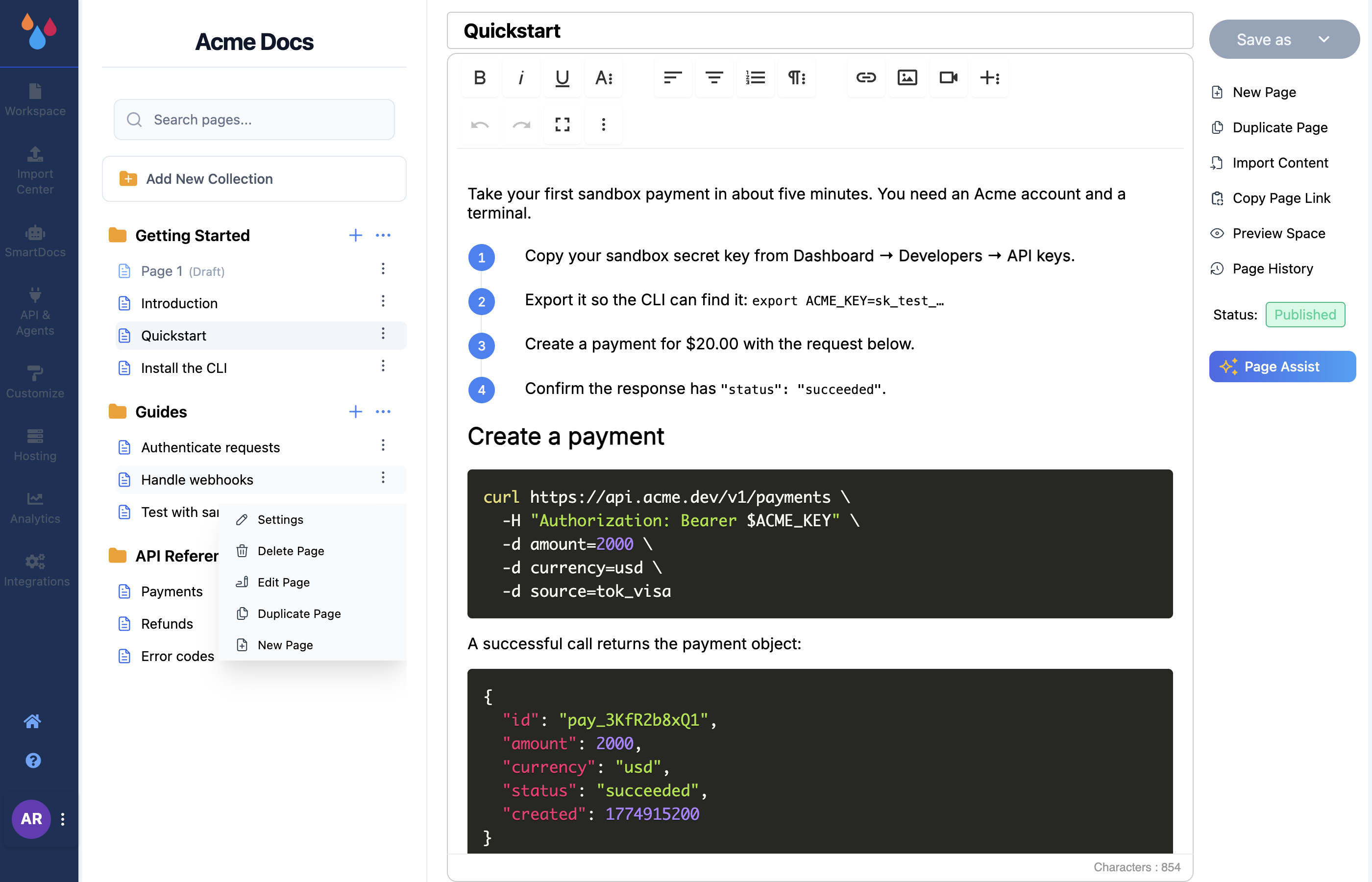
Everything you do to an existing page runs from one of two places: the ⋮ menu on the page's row in the workspace editor sidebar, or a drag of that row. Draft and published pages behave identically here – publishing changes who can see a page, not how you edit it.
The ⋮ menu holds Settings, Delete Page, Edit Page, Duplicate Page, and – on rows that can take children – New Page.
Rename a page
There are two ways, and they do the same thing:
- Open the page and edit the title field at the top of the editor (placeholder Enter Title).
- Or open Settings from the row's ⋮ menu and edit Title there, then click Save.
Renaming changes the sidebar label and the page heading on your docs site. It does not change the URL.
Change a page's slug
The slug is the last segment of the page's URL, and it lives in the Settings panel next to the
title. Dewstack never derives it from the title, so a page created and renamed but never
slug-edited keeps its original untitled-3 URL.
Slug rules are the same as for collections: lowercase letters and digits with single hyphens between words. Anything else is rejected with "Slug format is invalid. Please use only lowercase alphabets or numbers and only hyphen between the words".
Changing a slug breaks existing links
Dewstack does not create a redirect from the old URL. Anything already pointing at the old address – bookmarks, support macros, search results, other pages in your docs – will 404. Get slugs right while a page is still a draft.
Reorder and nest pages by dragging
Drag a page row to move it. The same gesture does three different jobs depending on where you drop:
- Drop between two rows in the same collection to reorder. This is the order readers see in the sidebar.
- Drop onto a page row to nest the page underneath it as a child.
- Drop into a different collection to move the page there. Its URL changes, because the collection slug is the first segment of it.
Dragging is blocked while any untitled page exists anywhere in the workspace – Dewstack shows "Unable to move the Collection or Page!" and asks you to save that page first. The public site renders one level of nesting (collection → page → child), so a page dragged under a child will not get a URL or a sidebar entry.
Duplicate a page
Duplicate Page copies the page's content into a new page in the same collection, named
<name>(Copy) – duplicating "Authentication" gives you a page titled Authentication(Copy).
The copy is created as a top-level page in the collection, as a Draft, with a fresh
untitled-N slug – so it is safe to duplicate a published page and rework the copy. Rename it and
set its slug before you publish, or you will ship a page titled …(Copy) at a URL that says
untitled.
Delete a page
Delete Page asks "Are you sure you want to delete?" and warns that it will permanently delete the page and any sub-pages under it. Confirm with Yes, Go Ahead. There is no undo and no trash – a deleted page is gone, along with its revision history.
One constraint surprises people: you cannot delete the only page in a collection. When a collection is down to a single page, its Delete Page item is dimmed and clicking it does nothing. To get rid of the last page, create a replacement page first, or delete the whole collection from the collection's ⋮ menu.
