A collection is a group of pages that forms one section of your docs sidebar – "Getting Started", "API Reference", "Troubleshooting". Every page in Dewstack lives in exactly one collection, and the collection's slug is the first segment of every page URL underneath it:
https://docs.acme.com/docs/api-reference/authentication
                           ^^^^^^^^^^^^^ ^^^^^^^^^^^^^^
                           collection    page
That makes a collection two things at once: the shape of your sidebar and the shape of your URLs. Pick the slug before you start linking to pages, because changing it later breaks every link into the collection.
Add a new collection
Collections are created in the workspace editor sidebar, not from the top-level navigation.
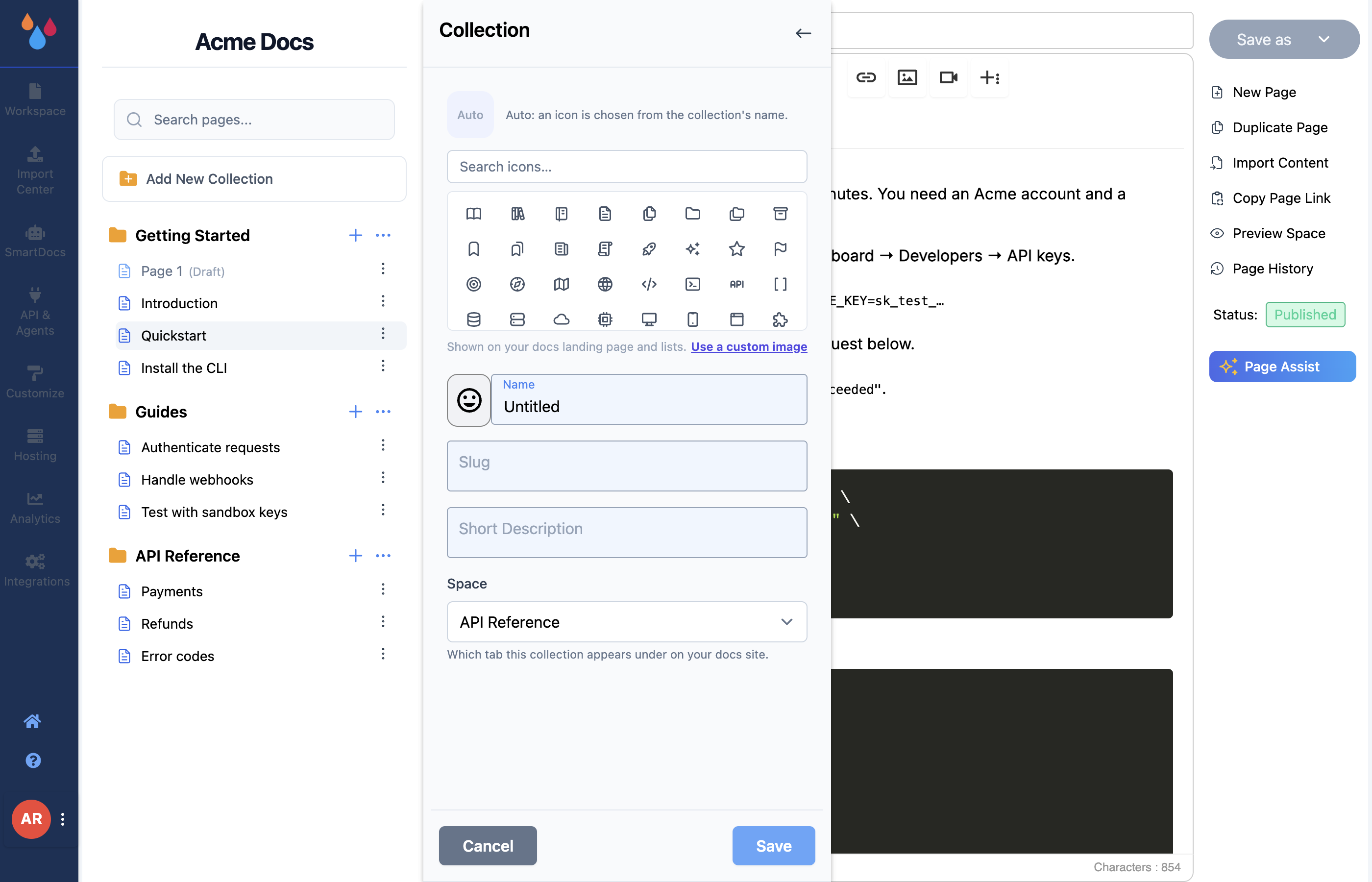
- Open a workspace and click Add New Collection at the top of the left sidebar.
- Fill in Name and Slug – both are required.
- Optionally pick an icon and write a short description.
- Click Save.
The new collection appears at the bottom of the sidebar with no pages in it. Until it has at least one published page, Dewstack hides it entirely from your docs site – an empty collection never shows up in the sidebar, on the landing page or as a tab.
What each field does
Icon – a Tabler icon, an uploaded image, or nothing. Left alone, it stays on Auto, where Dewstack picks an icon from the collection's name. See Manage a Collection for the picker in detail.
Name – what readers see as the section heading in the sidebar and on the landing page. The placeholder is Untitled. Leaving it blank fails with "You must enter a Name of the collection."
Slug – the URL segment. Dewstack does not derive this from the name; you type it yourself, and it stays whatever you typed no matter how often you rename the collection.
Short Description – one line shown under the collection name on your docs landing page. It has no effect anywhere else, and it is optional.
Space – a select that only appears once the workspace has at least one space. It decides which tab the collection appears under, and its help text says so: "Which tab this collection appears under on your docs site." The first option is Default (). With no spaces defined, the field is not rendered at all.
Slug rules
A slug must be lowercase letters and digits, with single hyphens between words – api-reference, v2-migration, faqs. No uppercase, no spaces, no underscores, no double hyphens, no leading or
trailing hyphen. Anything else is rejected with:
Slug format is invalid. Please use only lowercase alphabets or numbers and only hyphen between the words
Slugs must also be unique inside the workspace. Reusing one gives you the toast "Slug already exists for this workspace. Please use a different slug."
Tip
Write the slug the way you would want it in a support ticket. getting-started is a better answer to "which page is that on?" than gs-v2-final.
