Three small sections at the bottom of Customize decide how search engines treat your Dewstack docs site, whether readers see a cookie notice, and whether a "Made with Dewstack" badge appears in the corner.
Meta title and description
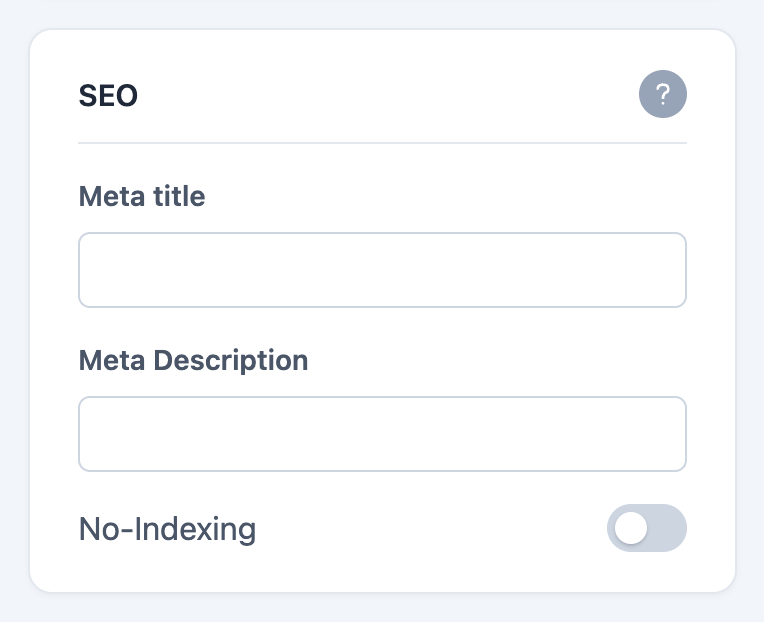
Customize → SEO has two text fields:
- Meta title – the title a search engine shows on its results page, and the text in the browser tab. Left empty, Dewstack falls back to your workspace name.
- Meta Description – the summary under the title in search results. Left empty, an article page uses its own excerpt.
Both apply site-wide as the default; an individual article page still gets its own title.
No-Indexing
The No-Indexing toggle in the same section adds a noindex robots directive to every page of your docs site. Turn it on while you are still writing, and search engines will drop the site from their results rather than index a half-finished draft.
Two things worth knowing:
- The toggle is off by default – a new public workspace is indexable, and stays that way until you turn No-Indexing on.
- A non-public workspace is
noindexregardless of this toggle. If your site is private or password-protected, Dewstack marks itnoindexand serves arobots.txtofDisallow: /whatever the setting says. You cannot accidentally expose a gated site to a crawler by leaving this off. See Access and content sharing.
Sitemap and robots.txt
Public workspaces serve /sitemap.xml – every published page and child page, with absolute URLs – and a /robots.txt that allows crawling and points at the sitemap. Private and password-protected workspaces return 404 for the sitemap and Disallow: / in robots.
The same robots file points crawlers at /llms.txt and /llms-full.txt, the machine-readable copies of your docs. Those are covered in AI-ready docs.
Cookie box
Customize → Cookie Box shows a consent notice to visitors. The toggle is Display Cookie Box, and four fields build the notice:
| Field | What it is |
|---|---|
| Cookie Message | The sentence shown to the visitor |
| Policy Label | The link text, e.g. "Privacy Policy" |
| Policy Link | The URL that link opens |
| Button Label | The text on the accept button |
Dewstack does not write the policy for you and does not block anything until consent is given – the box is a notice with a link and an acknowledgement button. If your site loads Google Analytics or a custom script, check what your jurisdiction requires before relying on this alone.
The "Made with Dewstack" badge
Customize → Dewstack Badge has one toggle: Display 'Made with Dewstack' Badge.
On, a small floating badge sits at the bottom left of your docs site, above the footer, on every page, and links to dewstack.com. Off, nothing renders.
The badge is not tied to a plan – you can turn it off on any workspace. Leaving it on is a courtesy, not a requirement.
